
Autodesk account connected
Your workspace is awaiting approval.
Pravin Yadav will review your request. Once approved, you can use the model workspace, BIM Copilot and project tools.
You can keep this page open. Your status refreshes automatically.
Profile & keys
Your Autodesk identity stays verified. Your display profile and optional services stay under your control.
Your first project review
Provider keys are optional. You can use application-managed services after approval.
Your profile
Autodesk identity & security
Password reset and email verification are handled by Autodesk. Your email and verified status cannot be changed by editing this profile.
Active sessions
Signing out here ends the hub session. Your Autodesk browser session is managed by Autodesk.
Autodesk APS connection
Use the hub’s APS app or connect your own for new projects.
Checking personal connection…
Existing projects use their original APS app. To reopen a project after disconnecting its personal app, reconnect that same app.
Optional personal Gemini connection
Use your own Gemini quota for cloud AI requests. Leave cloud AI disabled for local evidence tools. Your key is never sent to Autodesk or returned to the admin dashboard.
Connection validation reads model information; it does not generate an answer. Keys are never repopulated after saving. To replace one, enter it again.
APS usage safeguards
New translations can incur provider usage charges. Existing derivatives are reused first. The app counter does not include other apps in your Autodesk account and is not a billing report.
Review Autodesk APS offerings ↗Delete application account
Remove your profile, personal keys, approvals, sessions and project memberships. Delete owned projects first. This does not delete your Autodesk account, original Autodesk storage objects or records controlled by other project owners.
This view is not available
Choose a tool from the navigation or return to your projects.
Open projectsProjects.
Separate files. A shared purpose. Access for the people you choose.
This is an experimental project integrating APS and AI, created by Pravin Yadav, BIM specialist at Dar Al-Handasah. Thank you for exploring and helping shape what comes next.
Local-only development mode. Autodesk identity and secure project sharing are disabled. Enable authentication before collaborating.
Your projects
Loading projects…Project files
Reference links
Project team
Team coordination notes
Shared with this project · refresh for updatesBuilding what’s next.
Explore the tools available today, then follow the direction ahead.
From a model
to a better next step.
An evolving workspace for model coordination, evidence-led AI and practical Revit workflows. Built by Pravin Yadav, with feedback from the people who use it.
A practical foundation.
Live capabilities depend on APS configuration, published model data and native Revit runner results.
Coordinate models
Multi-model 3D, published plans and sheets, quantities and bounding-box clash candidates.
Open workspace ↗Ask with evidence
Model-aware tool calls, selected-element checks, property inspection, viewer actions and exports.
Meet BIM Copilot ↗Audit & automate
18 native health topics, linked-file inventories, custom QA/QC and IFC / NWC recipes.
Explore automation ↗Work as a project team
Email-based access roles, isolated file lists, shared notes, saved views, knowledge and drawing reviews.
Your projects ↗Release history · the foundation so far
Five color palettes, a ten-second welcome, custom file dashboards, live model presentations and PowerPoint exports.
Full-page greetings, soft cursor trails, click feedback and an interactive roadmap.
A new APS & AI identity, per-file upload progress, retryable storage parts and translation recovery.
Cursor and ambient motion, scroll entrances, a three-second developer welcome and a help assistant with app guides.
Autodesk sign-in, project-specific files, email access roles, shared notes and onboarding.
Compact controls, large-model context uploads, selection reviews and property inspection.
Source-aware return to 3D, measured-report readiness and one workspace navigation.
Plans and sheets, revision clouds, native link matrices and verified element navigation.
Streamed tool activity, teaching playbooks, cancellation and scoped model actions.
A direction, open to feedback.
All milestones below are planned, with no completion percentage or delivery guarantee. They are a proposed direction, not completed integrations.
Showing 5 of 5 planned milestones
Harden the foundation
Validate live Autodesk sign-in, project-scoped tokens and real RVT viewing; improve recovery, deployment guidance and accessibility.
Explore proposed deliverables
- Documented authentication and permission checks with real project accounts.
- Deployment recovery, accessibility review and model-loading diagnostics.
Connect project knowledge
Explore document extraction, richer retrieval and source-linked answers across specifications, RFIs and model metadata.
Explore proposed deliverables
- Document-ingestion experiments with explicit coverage and source citations.
- Evaluation questions linking model properties to project specifications.
Deepen model review
Evaluate geometry-aware clash refinement, rule packs, revision comparisons and clearer issue ownership across disciplines.
Explore proposed deliverables
- Compare refined candidates against human-reviewed coordination cases.
- Prototype revision comparisons and discipline-specific review rules.
Extend native automation
Explore APS Automation job execution, monitored delivery pipelines and repeatable IFC / NWC / QA/QC report packages.
Explore proposed deliverables
- Evaluate authenticated job execution and status callbacks.
- Validate repeatable export packages against native Revit outputs.
Measure and improve
Explore sourced carbon factors, project trend comparisons, feedback-driven Copilot evaluations and stronger collaboration workflows.
Explore proposed deliverables
- Test explicit carbon-factor sources, quantities, units and uncertainty.
- Review Copilot quality and collaboration feedback using documented cases.
What should improve your next model review?
Explore the tools, note what gets in your way, and share your experience with Pravin.
Engineering ideas.
Into useful digital tools.
A little about me, the areas I work across, and why I built this hub.
Pravin Yadav
BIM specialist at Dar Al-Handasah
Connecting BIM, automation and AI to make model information more useful.
I work as a BIM specialist at Dar Al-Handasah. My focus is bringing BIM coordination, Autodesk workflows and cloud-enabled AI closer to the day-to-day needs of project teams.
I enjoy building practical tools: turning model data into clear insights, making repetitive checks easier to repeat, and connecting engineering questions with evidence people can inspect.
The areas I work across.
Digital practice, Autodesk model workflows, and cloud-enabled AI.
BIM with a project purpose.
Working at the intersection of engineering information and practical digital delivery, with a focus on coordination and clearer model review.
Dar Al-Handasah
Models that connect to action.
Revit and APS workflows that bring model exploration, property checks, coordination evidence and repeatable automation into one workspace.
Autodesk Platform Services Google Cloud
Making information easier to use.
Exploring Google Cloud and AI integration for model-aware assistants, connected information and workflows that help teams ask better questions.
Google CloudFrom model data
to something people can use.
I created APS & AI Solutions Hub as an experimental space to connect Autodesk Platform Services and AI with everyday BIM tasks: explore a model, ask a question, inspect the evidence, and choose a useful next action.
The direction is practical: model-related Copilot answers, reusable QA/QC checks, clearer coordination reports and automation that teams can review before they run it.
See the project journey & roadmap ↗Have a BIM workflow in mind?
I welcome conversations about BIM, Autodesk automation, cloud workflows and practical AI integration. Thank you for exploring this project and helping shape what comes next.
Connected APIs. Intelligent workflows.
Bold connector shapes surround an intelligence core. Download the reusable APS & AI Solutions Hub™ wordmark in light, dark and monochrome formats.




Where can I update this photo?
Your supplied portrait is already included in this release. The configured maintainer account can replace it using Change profile photo below. Other accounts can view the profile.
Change profile photo
Your photo appears on this About page and the sign-in page. Upload a replacement here; the change applies across this hub.
Workspace overview.
Bring your models, disciplines and decisions together.
Every discipline.
One shared view.
Connect architecture, structure and MEP. See the whole building before the next decision.
Open model workspaceBuilt around your workflow
From coordination to deliveryFind the conflicts
Compare models and review hard clashes or clearance candidates.
Make the workspace yours
Manage your profile, optional APS and Gemini connections, and privacy preferences.
Ask your model
Explore categories, isolate elements and understand coordination results.
Project files
Recent models in this workspace
Loading project files…
Connection status
Services for this workspace
Model workspace
Coordinate disciplines in shared model space
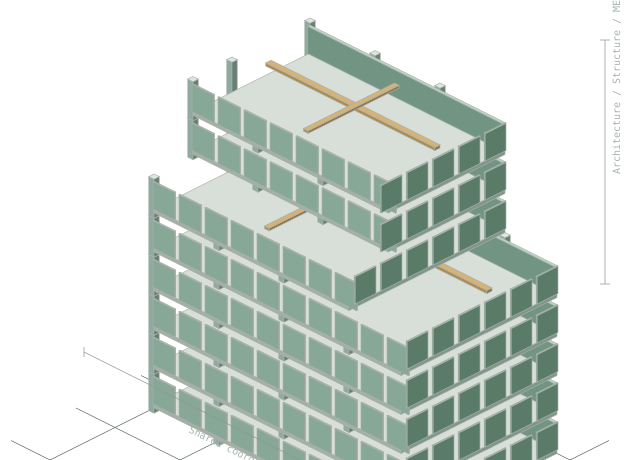
Coordinate every discipline in one scene
Upload Revit, IFC, DWG or Navisworks files, link them into a shared 3D view, then check them against each other for clashes.
Files, context & next steps.
A source-aware view of the work you can present and review.
Turn your model
into a clear conversation.
Open a project to see its file register and available evidence.
Saved presentations
A story built from your project
Build your project outline
Select Build outline to create a review using the current file register and indexed model summary.
Link a translated source in Model workspace, then choose Use current 3D scene. A metadata presentation works while model translation is unavailable.
The live scene uses currently linked project models. Captures become static images in PowerPoint.
Connections & help.
Personalize your workspace and find help with your project workflows.
Color palettes
Your palette works with both light and dark appearance.
Appearance
Choose light or dark mode
Choose expressive transitions or keep movement minimal. Device reduced-motion settings always apply.
Model workspace
Open a project, add your model files and explore the translated models in 3D.
Use Plans & sheets for published drawings, or compare disciplines in the shared model view.
Open model workspaceBIM Copilot
Ask about the models in your project, inspect the evidence and review suggested next steps.
Select an element in 3D to focus the conversation. Locate, highlight or isolate results when an element action is available.
Open BIM CopilotUsing your workspace
- Open a project you own or one shared with your Autodesk account.
- Add models and wait for processing to finish.
- Link available models to 3D and choose a review workflow.
- Use the Hub Help chat button for guidance as you work.
For account or service availability issues, contact the application team.
Open projectsReview & reporting
Review available coordination evidence, model checks and native audit results before preparing a report.
Build a presentation from the current project to share findings with your team.
Open report centerBIM specialist at Dar Al-Handasah
Chat with your model.
Ask questions, inspect the evidence and approve proposed view changes.
Guided coordination review
Review the live workspace in three steps, then draft a handoff from the findings.
- 01Model coverageSaved files and indexed elements
- 02Metadata qualityCategory, level and material gaps
- 03Clash coverageExisting run and open candidates
Uses the models currently loaded in this workspace.
Model conversationLIVE
Evidence tools availableSettings & source
Suggested tools Optional
Design review.
Run configurable metadata checks and inspect the affected elements.
Review rules
These checks identify metadata gaps. They do not certify building-code or engineering compliance.
Review findings
Create reportRun a review to see rule coverage, failures and element-level evidence.
Embodied carbon copilot.
Use explicit material quantities and factor sources to compare a scenario.
Material impact factors
Enter project EPD or other verified factors. Match material names exactly. Unknown units and compound materials without allocation are excluded.
| Material | Basis | kg CO2e / unit | Density kg/m3 | Source / declared scope |
|---|
Results & coverage
Create reportAdd factors with sources, then calculate. Missing data is reported as excluded, not zero impact.
Project knowledge.
Retrieve source passages alongside your model metadata.
Add project knowledge
Paste text or import TXT, MD, CSV or JSON. Documents are stored by this local server. PDF and Word extraction are not included.
Search your evidence
Lexical retrieval returns excerpts and source IDs. Gemini can synthesize retrieved text from the AI workbench.
Source documents
Report center.
Generate a review-ready report from the current model snapshot and issue register.
Report details
Uses indexed model metadata, coordination results and supplied factors. For the 18 native Revit health topics, collect and import a runner result.
Open native QA/QC reports →Reports include source coverage, clash statuses and owners, rule evidence, carbon factors, knowledge sources and limitations. HTML can be printed to PDF.
Your model.
Your evidence.
A clear next step.
Developer: Pravin Yadav- Model inventory and snapshot coverage
- Clash issue register, owner and status
- Design-review rule failures and evidence
- Embodied carbon scope and exclusions
- Knowledge sources and review limitations
APS MCP server.
Explore the available tool catalog for model and project workflows.
Explore agent capabilities
Review the tools that support model discovery, property questions and coordination tasks.
For model-aware questions in this workspace, open BIM Copilot. Agent integrations are managed by the application team.
Open BIM Copilot ↗Tool catalog
Available operations depend on your access and the connected services. Translation can consume service capacity.
Revit QA/QC audit.
Measured values, editable benchmarks and explicit evidence coverage.
Import a Revit runner result for this model. APS viewables do not contain all native health metrics.
Audit results
Report details
Host measurements and linked document measurements are evaluated separately.
Unknown measurements never pass as healthy.
| Audit parameter | Measured actual value | Project benchmark | Status |
|---|
Import native results
Open the matching original RVT in Revit, run a downloaded recipe, then import APS-audit-result.json. A matching source checksum is used when available.
No result selected
Link inventory
Create link check jobNative Revit link instances, paths, load state, unique file sizes and worksets. Viewer federation counts are a different measurement.
Import native link inventory to see records here.
Reusable QA/QC template
Edit audit benchmarks (18 checks)
These are project policies. Adjust thresholds for your delivery standard. Unknown metrics remain unknown regardless of threshold.
Custom parameter rules
Rules can run against indexed APS properties or as native instance/type parameter checks in the Revit runner. Numeric ranges require explicit matching units.
Advanced template JSON / warning severity map / workset names
Map native warning failure GUIDs to critical/high/medium/low. Unmapped warnings do not receive invented severities. No script code is accepted.
Project automation.
Export project models, run repeatable reviews and reuse project AI guidance.
Model exports
Select an uploaded Revit project and download the file Autodesk produces.
Checking project export access…
Custom workflows & project AI
Run repeatable checks on indexed properties, project files and imported native evidence. Save your team’s guidance once and use it in Copilot.
Viewers can inspect saved reports and use shared AI profiles. Ask the owner for editor access to build or run workflows.
Run a project review
Build or edit a custom workflow
Findings use available project evidence. Unknown native data is not a completed model-health check. Metadata may cover only part of the model.
Saved review history
Cloud access and native processing
Check which Autodesk Automation engines the project’s APS connection can access.
What cloud execution needs
Publish the Revit export add-in as an AppBundle and link it to an Activity. Model exports shows the configured options. Checking API access does not submit a processing job.
About Autodesk Automation APIs ↗